
By an AI systems architect with 8+ years building production agentic pipelines | Last updated: July 2026
Here’s something that still surprises people when I say it out loud: the most successful AI agent deployments in production right now aren’t impressive because of their models. They’re impressive because of everything around the models.
I’ve spent the better part of two years helping engineering teams deploy AI agents that don’t embarrass them in front of clients. And the single biggest lesson? Picking the right LLM matters far less than most people think. What matters is the scaffolding you wrap around it. There’s now a name for that scaffolding: harness engineering.
If you’ve heard the term floating around since early 2026 and wondered what it actually means in practice, this is the deep-dive you’ve been looking for. We’ll cover the definition, the core components, real-world examples from OpenAI, Stripe, and LangChain, how it compares to prompt and context engineering, and exactly how you’d start building a harness today.
What Is Harness Engineering? (The Snippet-Ready Definition)
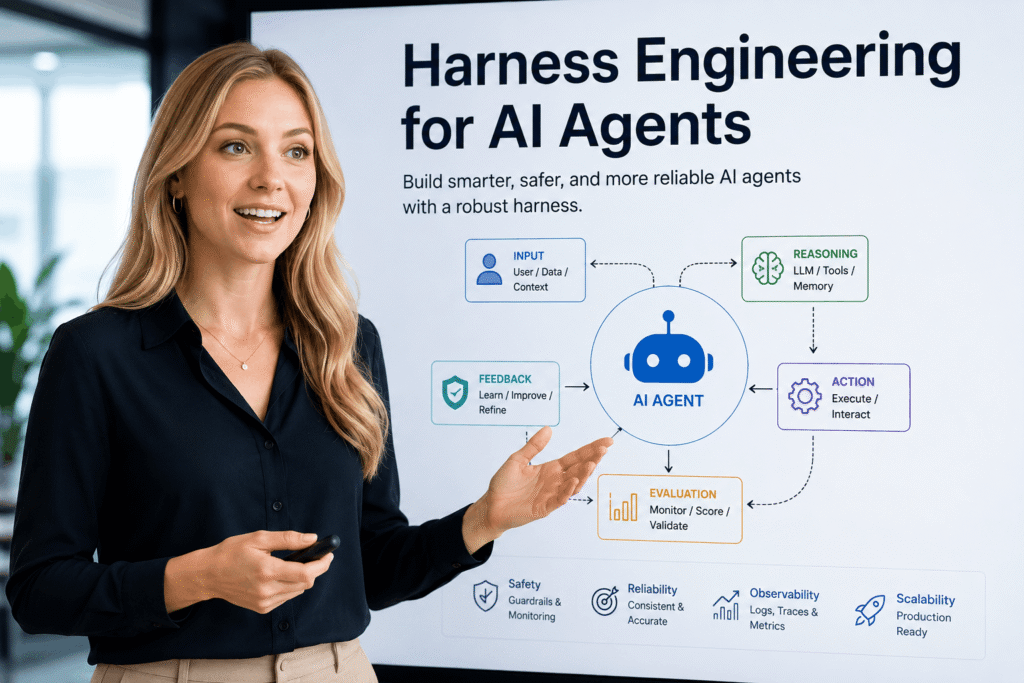
Harness engineering is the discipline of designing the systems, constraints, tools, memory layers, and feedback loops that surround an AI agent to make it reliable in production environments. The harness is not the agent itself. It is everything that turns a raw language model into a trustworthy autonomous system. The core formula, popularized by Mitchell Hashimoto and LangChain in early 2026, is: Agent = Model + Harness. The model provides reasoning; the harness provides accountability.
Think about where the name comes from. A harness is the equipment fitted to a working horse: reins, saddle, bit, bridle. The horse is powerful but unpredictable. Without a harness, it goes wherever it wants. With one, that power becomes directed, controllable, useful. The AI model is the horse. Harness engineering is the discipline of building everything in between.
Why This Wasn’t a Problem Two Years Ago (But Is Now)
Rewind to 2024. Most teams were using AI for single-turn tasks. You typed a prompt, got a response, reviewed it, moved on. In that world, prompt engineering was enough. You just needed to get good at writing clear instructions.
Then agents happened.
Suddenly, instead of one-shot completions, you had AI systems running autonomously for hours. Making hundreds of tool calls. Writing code, executing it, reading the output, writing more code. Planning tasks across sessions. Delegating subtasks to other agents. And failing in ways nobody had planned for. Not because the models were bad. Because the environment around the models was poorly designed.
A recent MIT study found that roughly 95% of generative AI pilots at large enterprises are failing to deliver measurable business returns. And according to research cited by enterprise AI consultants in 2026, 65% of enterprise AI failures trace back to what practitioners call “harness defects” specifically: context drift, schema misalignment, and state degradation. Not model quality. Not prompt quality. Harness quality.
That gap is what harness engineering addresses. And it landed as a formal discipline at a very specific moment.
How the Term Was Born (And Why It Spread So Fast)
On February 5, 2026, Mitchell Hashimoto, co-founder of HashiCorp and creator of Terraform, published a blog post with a deceptively simple definition: “Anytime you find an agent makes a mistake, you take the time to engineer a solution such that the agent never makes that mistake again.”
Within days, OpenAI published their own engineering deep-dive. Ryan Lopopolo described how a three-person team at OpenAI had spent five months building a production application using only AI-generated code, with zero manually written lines, producing over one million lines of code and 1,500 merged pull requests. The team’s job was not to write code. Their job was to design and maintain the harness.
LangChain crystallized it with the formula: Agent = Model + Harness. If you are not the model, you are the harness.
The metaphor resonated because it named something every engineer building agents had already experienced but didn’t have language for. The model wasn’t the problem. The environment around it was.
Harness Engineering vs. Prompt Engineering vs. Context Engineering
Here’s where a lot of people get confused, so let’s be precise.
Prompt engineering tells the model what to do. It optimizes instructions for a single interaction. It works well for bounded, one-off tasks. The limitation: prompts are probabilistic. You’re asking the model to comply. It usually does. Sometimes it doesn’t.
Context engineering gives the model what it needs to know. It manages the information environment: conversation history, retrieved documents, tool definitions, structured formats. Anthropic advisor Andrej Karpathy crystallized this in late 2025. It’s essential for stateful sessions. But it still doesn’t enforce anything.
Harness engineering ensures the agent reliably does the work. It operates at the system level. It enforces constraints the model cannot bypass. It defines feedback loops that catch failures. It manages permissions, memory, hooks, and orchestration across sessions.
The hierarchy: Prompt engineering shapes behavior. Context engineering shapes understanding. Harness engineering shapes system reliability.
Here’s the practical difference. Telling an agent “follow our coding standards” in a prompt is fundamentally different from wiring a linter that blocks the pull request when standards are violated. The first approach relies on probabilistic compliance. The second enforces deterministic constraints. Harness engineering is the discipline of building the second kind of system.
Research from Princeton demonstrates that harness configurations can improve agent solve rates by up to 64% compared to basic setups, with the same underlying model.
The Six Core Components of a Production Agent Harness
Every production harness, regardless of whether you’re using Claude Code, OpenAI Codex, LangChain, or a custom stack, has these building blocks. The names vary by vendor. The functions don’t.
1. Persistent Instructions (The Guide Layer)
This is the harness telling the agent, at the start of every session, who it is and how it should operate. It lives in a configuration file. AGENTS.md for OpenAI Codex. CLAUDE.md for Anthropic’s Claude Code. GEMINI.md for Google’s Gemini CLI.
These files contain coding conventions, naming standards, architectural decisions, commit message formats, testing requirements. They are the agent’s institutional memory across sessions.
One critical insight that most teams learn the hard way: keep these files short. An internal analysis of harness performance found that a 100-line CLAUDE.md consistently outperforms a 1,000-line version. The longer file creates context bloat that degrades decision quality. The entry file should act as a table of contents pointing to a structured docs/ directory, not a manual containing everything. A lightweight entry point plus well-organized subdirectories beats one enormous file every time.
2. Tools and Integrations (The Action Layer)
Tools are what allow agents to act on the world rather than just generate text. File system access, web search, code execution, database queries, API calls. The Model Context Protocol (MCP), developed by Anthropic and widely adopted in 2025-2026, has become the standard for connecting agents to external services. Think of it as the USB-C port for AI agent tooling: a single interface that lets any compliant agent use any compliant tool.
The harness defines which tools exist, how they’re called, what parameters they accept, and what happens when they fail. Tools defined in the harness are available to the agent on every run, consistently, without requiring re-description in each prompt.
3. Permissions and Safety Gates (The Trust Layer)
This is where the harness gets deterministic. Permissions define what actions the agent is allowed to take, regardless of what the model wants to do. Claude Code uses allow/ask/deny rules across six permission modes. A PreToolUse hook exiting with code 2 is the only mechanism that unconditionally blocks a tool call. Importantly: instructions in the guide layer can still be overridden by model reasoning. Hooks cannot be bypassed.
The OWASP LLM Top 10 for 2025 identifies “excessive agency” as a primary risk: over-provisioned permissions, unnecessary functions, and missing approval mechanisms. A well-designed harness applies the principle of least privilege to every tool the agent can call.
4. Memory and Context Management (The State Layer)
Agents running across multiple sessions need to remember things. But there’s a nasty problem called “context rot”: as sessions extend, the context window fills with stale, redundant, or low-signal information that degrades decision quality. Anthropic’s research on long-running agents found that merely extending the context window doesn’t prevent this.
The harness manages memory at multiple levels: working memory (the current context window), session memory (checkpointed state between turns), and long-term memory (persistent storage across sessions). Structured compaction strategies, where the harness summarizes older portions of the context rather than truncating them, can extend effective working memory significantly.
5. Verification and Feedback Loops (The Sensor Layer)
This is where most teams underinvest. The harness needs sensors to catch failures as they happen, not after they’ve propagated through ten more steps.
Verification loops look like this: after each significant action, the harness runs automated checks. Tests pass or fail. Linters run. Type checkers validate. The results are fed back to the agent with the error text, and the loop continues. LangChain’s team identified verification middleware as one of three harness improvements that jumped their coding agent from the 30th to the 5th position on Terminal Bench 2.0, without changing the underlying model at all. Same model. Pure architecture gain.
The accuracy improvement: from 52.8% to 66.5% on the same benchmark. That’s a 13.7-point gain from harness changes alone.
6. Observability (The Visibility Layer)
You can’t fix what you can’t see. Harness observability means capturing traces of every agent action: tool calls, reasoning steps, context snapshots, errors, and timing data. When an agent does something unexpected, observability turns “my agent did something weird” into a reproducible bug report with a specific timestamp, a specific tool call, and a specific context state.
Production harnesses in 2026 treat observability as a first-class concern from day one, not as something added after problems appear.
The Ratchet Principle: Why Harness Engineering Is a One-Way Street
This is the concept that Addy Osmani has articulated most clearly, and I think it’s the most important mental model in this entire discipline.
The harness only tightens. Never loosens.
When an agent makes an error, you don’t fix the output. You fix the harness so that error can never happen again. Hashimoto called this practice “engineering the harness” in his February 2026 post. Every mistake is a permanent fix to the system, not a one-off correction to a single response.
Practically: if the agent didn’t know a rule, add it to CLAUDE.md. If the agent knew the rule but violated it, add a hook that enforces compliance. If the agent made a valid decision with bad data, fix the tool or the memory layer that provided the bad data.
The ratchet metaphor is apt. Each click tightens the harness by one notch. You can’t go backward. Over time, the system becomes measurably more reliable not because the model improved, but because the harness accumulated fixes.
This is fundamentally different from how most teams approach agent failures. The instinct is to re-run the task, edit the prompt slightly, and hope for a better outcome. The harness engineering mindset rejects that. Every failure is diagnostic data. Every fix goes into the system.
Three Real-World Harness Engineering Examples
OpenAI’s Codex Team: 1 Million Lines, Zero Human Code
In late August 2025, a three-person team at OpenAI started with an empty repository and a mandate to ship a production application. For five months, they wrote not a single line of code themselves. Every line came from Codex, their AI coding agent.
The result: one million lines of production code, 1,500 merged pull requests.
What the team actually did during those five months was harness work. When the agent guessed wrong about architecture because no decision had been documented, they created structured architectural decision records. When naming conventions were inconsistently applied, they built a linter that enforced them at the PR level. When the agent couldn’t answer “what abstraction layer should I use here?”, they built a retrieval system that surfaced the relevant architecture discussion from two weeks prior.
The harness work made the agent’s environment unambiguous. And unambiguous environments produce reliable outputs.
Stripe’s Minions: 1,300 Pull Requests Per Week
Stripe processes over $1 trillion in payment volume annually across a codebase containing hundreds of millions of lines of Ruby. They built an internal AI agent system called Minions, and as of early 2026, those agents are merging over 1,300 pull requests per week containing zero human-written code.
The architecture is built on what Stripe calls “blueprints”: a sequence of nodes where deterministic steps alternate with agentic steps. Creative steps (writing code, fixing failures) use the full agent loop with tool access and reasoning flexibility. Critical steps (running linters, pushing branches, creating PRs in Stripe’s specific format) are hardcoded. The agent cannot choose to skip them.
Stripe’s harness includes 500 MCP-connected tools, sandboxed virtual machines that spin up in ten seconds, and a three-million-test CI suite that runs automatically after every agent commit. Every Minion operates in complete isolation, with no internet or production access, which eliminates the need for human permission checks on routine tasks.
What makes this transferable: the blueprint pattern. Alternating deterministic and agentic nodes isn’t Stripe-specific. Any team can adopt it. Identify the steps where agent judgment adds value (creative) and the steps where consistent execution is what matters (deterministic). Build the second category into the harness infrastructure, not the prompt.
LangChain’s Terminal Bench Jump
In March 2026, LangChain’s engineering team published a case study that became widely cited. They moved their coding agent from the 30th to the 5th position on Terminal Bench 2.0, a rigorous benchmark for real-world coding task completion. The model did not change. The harness did.
Three specific harness improvements produced the gain. First: richer guide files with negative examples (routing accuracy improved from 73% to 85% when SKILL.md files included examples of what not to do, alongside examples of correct behavior). Second: a managed shell container providing durable tool execution across the session. Third: verification middleware that made the agent check its own work before marking a task complete.
Combined accuracy improvement: from 52.8% to 66.5%.
The lesson is uncomfortable for teams betting heavily on model selection: the gap between a mediocre model in an excellent harness and an excellent model in a mediocre harness may be larger than the gap between the models themselves. According to Faros AI’s 2026 analysis, open-weight models paired with a highly optimized harness can match or outperform expensive frontier models on real-world coding tasks.
Common Harness Engineering Mistakes (And What to Do Instead)
Mistake #1: Treating the guide file as a dump for everything.
Engineers discover CLAUDE.md and immediately paste every standard, convention, and policy they can think of. A 1,000-line guide file is not a better guide file. It’s a context-bloat disaster. The agent’s attention degrades as the file grows. Keep the entry file under 100 lines, use it as a navigation index, and store detailed conventions in a structured docs/ directory the agent can retrieve selectively.
Mistake #2: Relying on instructions where hooks are needed.
This is the most common reliability failure I see. Teams add a rule to the guide file and assume the agent will follow it. Often it does. Sometimes it doesn’t. For any rule where inconsistent compliance is unacceptable (security requirements, legal compliance, format standards that downstream systems depend on), the fix doesn’t belong in the guide. It belongs in a hook that enforces compliance at the tool-call level, regardless of what the model decided.
Mistake #3: Building the harness after the agent is in production.
Harness debt is real, and it compounds faster than technical debt. Every week an agent runs without proper verification loops, without proper observability, and without a permission model, it’s accumulating a track record of inconsistent behavior that teams rationalize as “model issues.” Usually they’re harness issues. Build the observability layer on day one, even if it’s lightweight. You need data about failures before you can fix them.
Mistake #4: Over-engineering early.
This one’s the counterintuitive one. Complex multi-agent orchestration with elaborate memory systems and dozens of hooks often performs worse than a simple, well-designed single-agent harness. The LangChain data showed their improvement came from three targeted changes, not a complete rebuild. Start simple. Let the ratchet principle guide what you add.
Harness Engineering Beyond Code: What Most Articles Miss
Almost every harness engineering article focuses on coding agents. That makes sense: that’s where the most visible production deployments are. But the principles apply to any AI agent operating autonomously over time.
Customer support agents need harnesses too. Memory layers that recall previous customer interactions. Permission gates that prevent the agent from making promises about refunds above a certain threshold without human approval. Verification loops that check whether the proposed resolution actually matches the customer’s stated problem before sending.
Research agents need harnesses. Context management strategies that prevent the agent from getting lost in a single source and missing contradictory evidence. Tools that check source credibility. Output verification that flags claims unsupported by retrieved documents.
Content agents need harnesses. Brand voice guides in the guide file. Hooks that run the draft through a readability checker before marking the task complete. Permission models that require human review before anything is published to a connected CMS.
The formula is the same. Agent = Model + Harness. The components adapt to the domain.
How to Build Your First Agent Harness: A Practical Starting Point
You don’t need Stripe’s infrastructure to start. Here’s a minimal viable harness for a coding agent, adaptable to any tool that supports CLAUDE.md or AGENTS.md configuration.
Step 1: Write a lean guide file. Start with 50-80 lines covering: the project’s primary purpose, the directory structure, naming conventions, the testing command, and the commit message format. Include one or two examples of what NOT to do for each convention. That last part is the one teams consistently skip, and it’s the part that makes the biggest difference.
Step 2: Define a minimal toolset. List the tools the agent needs to complete its tasks. Resist the urge to give it access to everything. Start with file reading, file writing, command execution, and test running. Add tools as specific tasks require them.
Step 3: Set a permission baseline. Identify which actions require human approval. Anything touching production systems, anything making external API calls with financial consequences, anything permanently deleting data. Start with these on an “ask” mode rather than “auto.” You can relax permissions later as you build trust.
Step 4: Add one verification loop. After the agent completes a coding task, automatically run the test suite and feed the results back to the agent. This single loop eliminates an entire category of failures. It doesn’t need to be sophisticated.
Step 5: Log everything. Even if you don’t analyze the logs immediately, capture timestamps, tool calls, inputs, and outputs. When something goes wrong (and it will), you’ll need this data to diagnose whether the problem was in the guide, a tool, a permission, or the model itself.
For further reading on building production-grade agent harnesses, LangChain’s engineering blog offers one of the most practical public resources available, specifically The Anatomy of an Agent Harness published in March 2026.
Frequently Asked Questions
What exactly is a harness in AI engineering? An AI harness is everything around the language model that makes it function as a reliable agent: the guide files containing instructions and conventions, the tools the agent can call, the permission rules governing what it’s allowed to do, the memory systems tracking state across sessions, the verification loops catching errors, and the observability infrastructure recording what happened and why. The model generates text; the harness determines what happens as a result.
How is harness engineering different from prompt engineering? Prompt engineering optimizes what you say to the model in a single interaction. Harness engineering designs the entire system the model operates within across many interactions. Prompts are probabilistic: the model usually follows them. Harness constraints are deterministic: hooks that block tool calls cannot be bypassed regardless of model reasoning. Both matter. Harness engineering becomes essential as soon as your agent runs autonomously for more than a few steps.
Can harness engineering really improve performance without changing the model? Yes, and the evidence is striking. LangChain moved their coding agent from 30th to 5th on a competitive benchmark purely through harness improvements, with accuracy jumping from 52.8% to 66.5%. Open-weight models paired with a highly optimized harness have matched frontier models on real coding tasks in independent evaluations. The harness often matters more than the model.
What is CLAUDE.md and how does it relate to the harness? CLAUDE.md is the guide file used by Anthropic’s Claude Code agent. It’s the entry point for the harness’s persistent instruction layer: a file the harness re-reads at the start of every session to give the agent its context, conventions, and operating rules. AGENTS.md serves the same function in OpenAI’s Codex. These files are one component of the harness, specifically the guide layer. A complete harness also includes tools, permissions, memory, verification, and observability.
What is the ratchet principle in harness engineering? The ratchet principle holds that every agent error should result in a permanent fix to the harness so that specific error can never occur again. When an agent fails, you diagnose which harness component failed (guide, tool, permission, memory, or verification) and you fix that component. Over time the harness tightens with each fix and the agent becomes measurably more reliable. The ratchet only moves in one direction.
How does MCP fit into harness engineering? The Model Context Protocol (MCP) is the standardized interface for connecting AI agents to external tools and data sources. In harness terms, it defines the action layer: how the agent calls tools, what parameters they accept, and how results are returned. A harness using MCP can connect to hundreds of external services through a consistent interface, with authentication and permissions managed at the harness level rather than requiring custom code for each integration.
Is harness engineering only relevant for coding agents? Not at all. Any AI agent operating autonomously over time needs a harness. Customer support agents need memory of past interactions and permission gates on consequential actions. Research agents need context management and source verification loops. Content agents need brand guide files and output quality checks before publication. The components are the same. The configuration adapts to the domain.
What should I do first if I want to start harness engineering today? Start with a lean guide file (under 100 lines), a minimal toolset specific to your task, one permission gate on the most consequential action the agent can take, and logging on all tool calls. That’s a minimal viable harness. Run it, watch where failures happen, and apply the ratchet principle: each failure becomes a permanent improvement. Don’t try to build everything at once.
Conclusion: The Model Is Not the Product
After watching dozens of agent deployments succeed and fail across different industries, here’s what I keep coming back to: teams that treat the model as the product almost always struggle in production. Teams that treat the harness as the product almost always ship something reliable.
The three things that matter most:
First, start with the ratchet. Every failure is a diagnostic. Every fix goes into the system. The harness accumulates reliability over time if you let it.
Second, lean files over fat files. A 100-line CLAUDE.md with clear negative examples beats a 1,000-line manual that bloats context and degrades decision quality.
Third, deterministic beats probabilistic for anything that really matters. If a rule must be followed, don’t put it in a prompt. Put it in a hook.
Harness engineering is the fourth paradigm of AI engineering, following prompt engineering, context engineering, and agent engineering. It’s where the production problems actually live. And unlike model selection, it’s fully within your control.
Start small. Apply the ratchet. Ship something that works.